Forces and Moments (အားအင်များနှင့် Moment များ)
Aerodynamics (လေထုဒိုင်နမစ်)
လေယာဉ်တစ်စင်းအပေါ် သက်ရောက်နေသော aerodynamic force များနှင့် moment (torque) များကို model ပြုလုပ်ရန် နည်းလမ်းများစွာ ရှိပါသည်။ JSBSim သည် coefficient buildup method ကို အသုံးပြု၍ စတင်ခဲ့ပါသည်။ Coefficient buildup method တွင်၊ lift force (ဥပမာအားဖြင့်) ကို lift ဆီသို့ ပံ့ပိုးသော အင်္ဂါရပ်အားလုံးကို ပေါင်းစည်း၍ ဆုံးဖြတ်ပါသည်။ ပံ့ပိုးမှုများသည် လေယာဉ်နှင့် model ၏ ကြိုက်နှစ်သက်မှု (fidelity) အလိုက် ကွဲပြားသော်လည်း၊ lift ဆီသို့ ပံ့ပိုးနိုင်သော အရာများတွင် အောက်ပါများ ပါဝင်နိုင်ပါသည်-
- အတောင်ပံ (Wing)
- Elevator
- Flap
Aerodynamic coefficient များသည် dynamic pressure နှင့် wing area ကဲ့သို့သော အခြားတန်ဖိုးအချို့နှင့် မြှောက်လိုက်သောအခါ force သို့မဟုတ် moment တစ်ခု ထွက်ပေါ်လာသော နံပါတ်များ ဖြစ်ပါသည်။ Coefficient များကို flight test report များ သို့မဟုတ် စာအုပ်များမှ ယူနိုင်သကဲ့သို့၊ software (ဥပမာ Digital DATCOM သို့မဟုတ် အခြား commercially available program) ကို အသုံးပြု၍ တွက်ချက်နိုင်သလို၊ လက်ဖြင့် တွက်ချက်၍လည်း ရယူနိုင်ပါသည်။ နောက်ဆုံးတွင် JSBSim သည် function များအဖြစ် သတ်မှတ်ထားသော aerodynamic property များကို support ထပ်ဖြည့်ခဲ့ပါသည်။ Configuration file တစ်ခု၏ <aerodynamics> section အတွင်း၊ force axis ၃ ခုနှင့် moment axis ၃ ခု (6 degrees of freedom စုစုပေါင်း) ကို ကိုယ်စားပြုသော subsection ၆ ခု ရှိပါသည်။ Aerodynamics section ၏ အခြေခံ layout မှာ အောက်ပါအတိုင်း ဖြစ်ပါသည်-
<aerodynamics>
   <axis name="DRAG">
      { force contributions }
   </axis>
   <axis name="SIDE">
      { force contributions }
   </axis>
   <axis name="LIFT">
      { force contributions }
   </axis>
   <axis name="ROLL">
      { moment contributions }
   </axis>
   <axis name="PITCH">
      { moment contributions }
   </axis>
   <axis name="YAW">
      { moment contributions }
   </axis>
</aerodynamics>
Axis တစ်ခုချင်းစီကို အားလုံး မဖြစ်မနေ သတ်မှတ်ရန် မလိုအပ်ပါ။ JSBSim တွင် support လုပ်ထားသော axis အုပ်စု standard အမျိုးမျိုး ရှိပါသည်-
"DRAG","SIDE","LIFT"(wind axes)"X","Y","Z"(body axes)"AXIAL","SIDE","NORMAL"(body axes)
System သုံးခုစလုံးသည် "ROLL", "PITCH", "YAW" axis definition များကို လက်ခံပါသည်။ Axial system များကို ရောနှောသုံးစွဲ၍ မရပါ။
Axis element များအတွင်း၊ function များကို axis ထို၏ စုစုပေါင်းသို့ individual force သို့မဟုတ် moment ပံ့ပိုးမှုများ သတ်မှတ်ရန် အသုံးပြုပါသည်။ Function များကို JSBSim တစ်လျှောက်လုံးတွင် အသုံးပြုပါသည်။ Force သို့မဟုတ် moment တစ်ခု သတ်မှတ်ရာတွင်၊ function များသည် table, constant, trigonometric function, သို့မဟုတ် standard C library function အခြားများကို အသုံးပြုနိုင်ပါသည်။ Simulation parameter များကို property များမှတစ်ဆင့် ရည်ညွှန်းပါသည်။ ဥပမာတစ်ခု ဖော်ပြရန်-
<function name="aero/force/lift_due_to_flap_deflection">
   <description>Lift contribution due to flap deflection</description>
   <product>
      <property>aero/function/ground-effect-factor-lift</property>
      <property>aero/qbar-area</property>
      <table>
         <independentVar>fcs/flap-pos-deg</independentVar>
         <tableData>
             0.0  0.0
            10.0  0.20
            20.0  0.30
            30.0  0.35
         </tableData>
      </table>
   </product>
</function>
ဤကိစ္စတွင်၊ အထက်ပါအရာသည် ဘာကို လုပ်ဆောင်သည်ကို စကားဖြင့် ဖော်ပြပါက အောက်ပါအတိုင်း ဖြစ်ပါသည်- function ၏ value သည် ground-effect-factor-lift, qbar-area, နှင့် flap position (degree ဖြင့်) ၏ function အဖြစ် index လုပ်ထားသော table က ဆုံးဖြတ်ပေးသည့် value တို့၏ product (မြှောက်ရလဒ်) ဖြစ်ပါသည်။
<axis/> section တစ်ခုအတွင်းရှိ function အားလုံးကို ပေါင်းစည်း၍ သင့်လျော်သော နည်းလမ်းဖြင့် လေယာဉ်အပေါ် သက်ရောက်စေပါသည်။ သို့သော်လည်း ဤ format တွင် flexibility အချို့ ရှိပါသည်။ <axis/> section တစ်ခုခု၏ အပြင်ဘက်တွင် သတ်မှတ်ထားသော function များကို ဖန်တီး၍ တွက်ချက်ပေးသော်လည်း၊ ၎င်းတို့သည် force သို့မဟုတ် moment စုစုပေါင်းတစ်ခုခုအတွက် ကိုယ်တိုင် တိုက်ရိုက် ပံ့ပိုးမှု မပြုပါ။ သို့သော်လည်း <axis/> section တစ်ခုအတွင်း ရှိနေသော function အခြားများက ၎င်းတို့ကို ရည်ညွှန်းနိုင်ပါသည်။ ဤနည်းလမ်းက individual function များစွာတွင် အသုံးချနိုင်သော တွက်ချက်မှုများကို တစ်ကြိမ်သာ ပြုလုပ်ပြီး အကြိမ်များစွာ ပြန်အသုံးပြုနိုင်စေပါသည်။ ဤနည်းလမ်းကို ပို၍ပင် ထပ်မံတိုးချဲ့နိုင်ပြီး၊ actual aerodynamic coefficient များကို <axis/> definition တစ်ခု၏ အပြင်ဘက်တွင် တွက်ချက်ထား၍၊ ထို coefficient များကို <axis/> definition တစ်ခုအတွင်း force နှင့် moment များအဖြစ် ပြောင်းလဲပေးသော factor (property) အမျိုးမျိုးဖြင့် function definition များအတွင်း နောက်ဆက်တွဲ မြှောက်ထားနိုင်ပါသည်။
ဥပမာအနေဖြင့်၊ instantaneous lift force \(L(t)\) ကို သုံးသပ်ကြည့်ကြပါစို့။ ၎င်းကို အောက်ပါ build-up formula ဖြင့် ဖော်ပြထားပါသည်-
ဤနေရာတွင် \(\alpha_\mathrm{B}\), \(\delta_\mathrm{flap}\), \(\delta_\mathrm{e}\), \(\dot{\alpha}_\mathrm{B}\) နှင့် \(q\) တို့သည် လူသိများသော လေယာဉ် state variable များ ဖြစ်ကြပါသည်။ Non-dimensional scalar ဖြစ်သော \(\phi_\mathrm{hyst}\) သည် ပုံမှန်အားဖြင့် 0 ဖြစ်ပြီး angle of attack မြင့်မားသောအခါ (aerodynamic hysteresis effect များကို model လုပ်ထားသော stall အနီးအနား အခြေအနေများတွင်) 1 ဖြစ်လာပါသည်။
(\(\ref{eq:Build:Up:Formula:Lift}\)) ရှိ \(L_\mathrm{basic} \big(\alpha_\mathrm{B},\phi_\mathrm{hyst}\big)\) term ကို build-up ၏ “basic” ပံ့ပိုးမှု ဟု ခေါ်ပြီး angle of attack ပေါ်တွင် မူတည်ပါသည်။ Angle of attack တိုးလာခြင်းက lift ကို တိုးစေကြောင်း ကျွန်ုပ်တို့ သိရှိထားပါသည် — အဆင့်တစ်ခုအထိသာ။ Lift force ကို ဓလေ့အားဖြင့် flight dynamic pressure (“qbar”, \(\bar{q}\), သို့မဟုတ် aerodynamicist များအတွက် \(\bar{q}_\infty\)), wing area (\(S_\mathrm{W}\) သို့မဟုတ် ရိုးရှင်းစွာ \(S\)), နှင့် lift coefficient (\(C_L\)) တို့၏ မြှောက်ရလဒ်အဖြစ် သတ်မှတ်ထားပါသည်။ ဤကိစ္စတွင်၊ lift coefficient ကို \(\alpha_\mathrm{B}\) နှင့် \(\phi_\mathrm{hyst}\) ကို table ထဲသို့ index အဖြစ် အသုံးပြု၍ lookup table တစ်ခုမှတစ်ဆင့် ဆုံးဖြတ်ပါသည်-
<function name="aero/force/lift_from_alpha">
   <description> Lift due to alpha </description>
   <product>
      <property> aero/qbar-psf </property>
      <property> metrics/Sw-sqft </property>
      <property> aero/function/kCLge </property>
      <table>
         <independentVar lookup="row"> aero/alpha-rad </independentVar>
         <independentVar lookup="column"> aero/stall-hyst-norm </independentVar>
         <tableData>
                      0.0000   1.0000
            -0.0900  -0.2200  -0.2200
             0.0000   0.2500   0.2500
             0.0900   0.7300   0.7300
             0.1000   0.8300   0.7800
             0.1200   0.9200   0.7900
             0.1400   1.0200   0.8100
             0.1600   1.0800   0.8200
             0.1700   1.1300   0.8300
             0.1900   1.1900   0.8500
             0.2100   1.2500   0.8600
             0.2400   1.3500   0.8800
             0.2600   1.4400   0.9000
             0.2800   1.4700   0.9200
             0.3000   1.4300   0.9500
             0.3200   1.3800   0.9900
             0.3400   1.3000   1.0500
             0.3600   1.1500   1.1500
         </tableData>
      </table>
   </product>
</function>
Basic lift coefficient
ကို \(\alpha_\mathrm{B}\) နှင့် \(\phi_\mathrm{hyst}\) ၏ function အဖြစ် အောက်တွင် plot ဆွဲပြထားပါသည်။
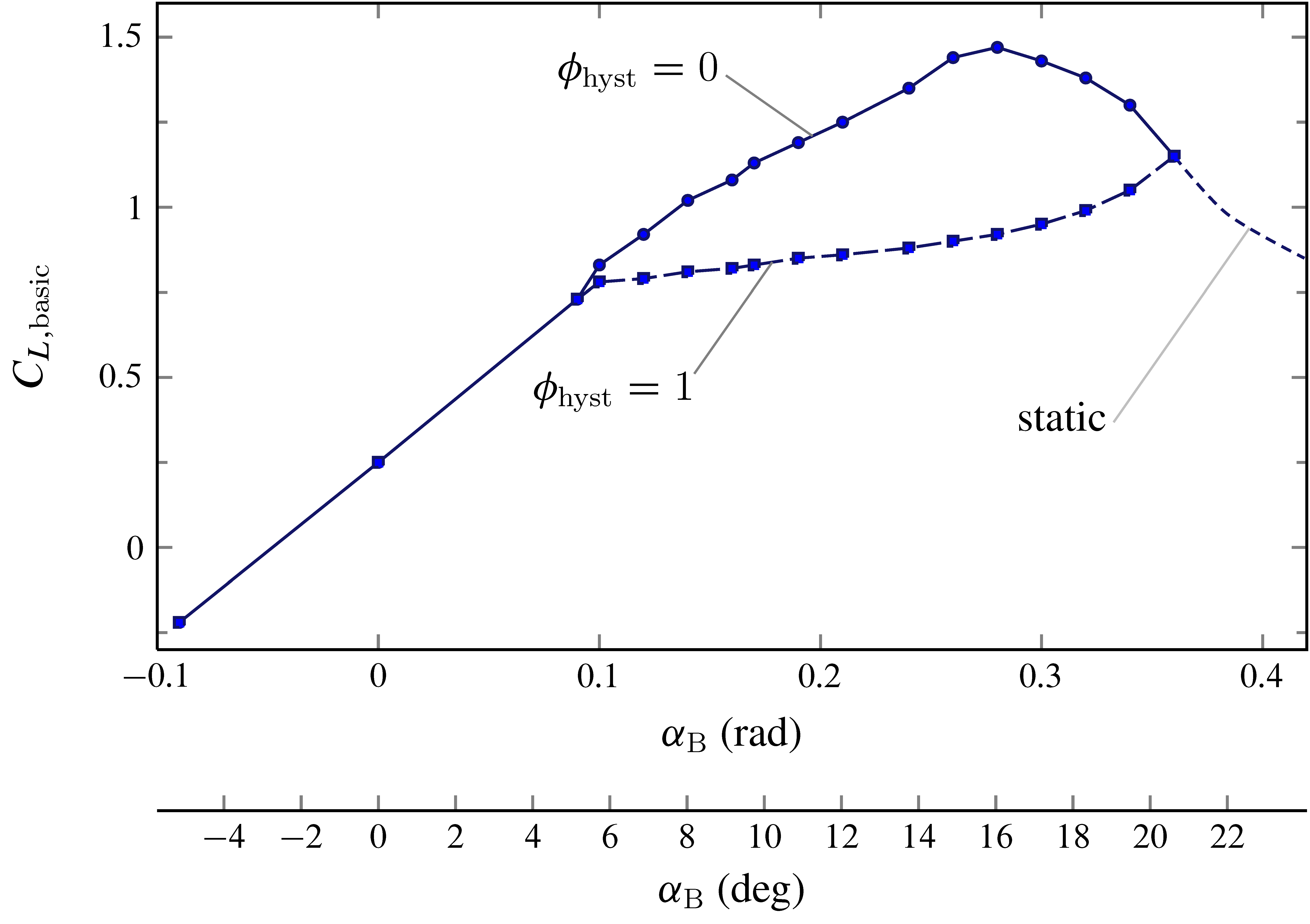
c172p ၏ aerodynamic model တွင် 'aero/coefficient/CLwbh' ဟု အမည်ပေးထားသော tabular function နှင့် သက်ဆိုင်သည့် variable နှစ်ခု \(C_{L,\mathrm{basic}}\big(\alpha_\mathrm{B},\phi_\mathrm{hyst}\big)\) ၏ plot လုပ်ထားသော function။
TODO
Subsection ကို ပြည့်စုံစွာ ဖြည့်စွက်ရန်။
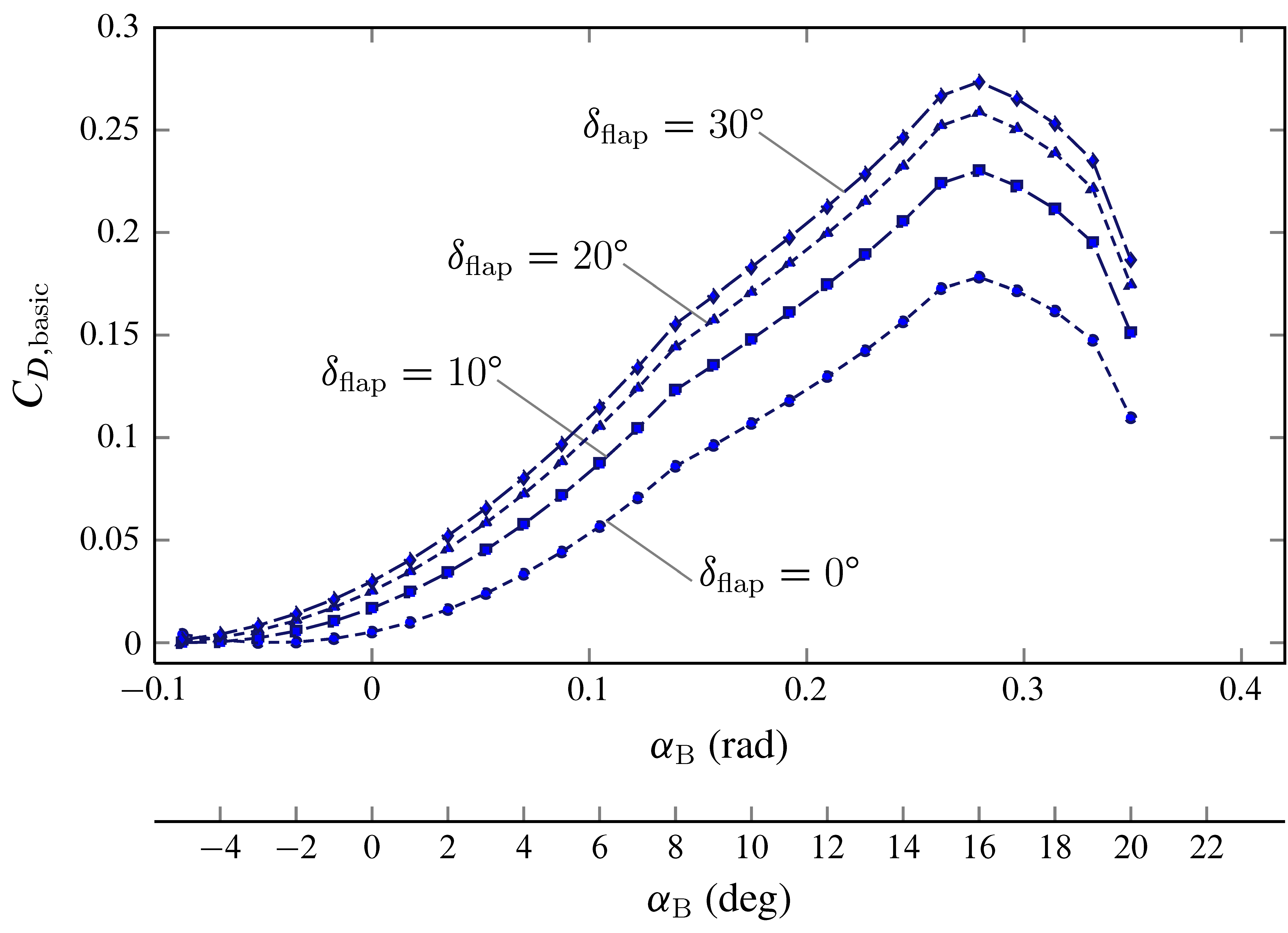
c172p ၏ aerodynamic model တွင် 'aero/coefficient/CDwbh' ဟု အမည်ပေးထားသော tabular function နှင့် သက်ဆိုင်သည့် variable နှစ်ခု \(C_{D,\mathrm{basic}}\big(\alpha_\mathrm{B},\delta_\mathrm{flap}\big)\) ၏ plot လုပ်ထားသော function။
TODO
အောက်ပါ subsection များကို ပြည့်စုံစွာ ဖြည့်စွက်ရန်။