Math (သင်္ချာ)
Functions (Function များ)
JSBSim တွင် function specification သည် JSBSim configuration file တစ်ခုအတွင်း algebraic function များကို သတ်မှတ်နိုင်သော စွမ်းအားကောင်းပြီး versatile ဖြစ်သော resource တစ်ခု ဖြစ်ပါသည်။ Function syntax သည် concept အနေဖြင့် MathML (Mathematical Markup Language, http://www.w3.org/Math/) နှင့် ဆင်တူသော်လည်း ၎င်းထက် ပိုရိုးရှင်းပြီး ပိုတိုတောင့်ပါသည်။
Function definition တစ်ခုသည် operation တစ်ခု၊ value တစ်ခု၊ table တစ်ခု၊ သို့မဟုတ် (value တစ်ခုအဖြစ် evaluate ဖြစ်သော) property တစ်ခုဖြင့် ဖွဲ့စည်းထားပါသည်။ လက်ရှိ support ပြုလုပ်ထားသော operation များမှာ-
sum(argument n ခု ယူသည်)difference(argument n ခု ယူသည်)product(argument n ခု ယူသည်)quotient(argument ၂ ခု ယူသည်)pow(argument ၂ ခု ယူသည်)exp(argument ၂ ခု ယူသည်)abs(argument n ခု ယူသည်)sin(argument ၁ ခု ယူသည်)cos(argument ၁ ခု ယူသည်)tan(argument ၁ ခု ယူသည်)asin(argument ၁ ခု ယူသည်)acos(argument ၁ ခု ယူသည်)atan(argument ၁ ခု ယူသည်)atan2(argument ၂ ခု ယူသည်)min(argument n ခု ယူသည်)max(argument n ခု ယူသည်)avg(argument n ခု ယူသည်)fraction(argument ၁ ခု ယူသည်)mod(argument ၂ ခု ယူသည်)lt(less than, argument ၂ ခု ယူသည်)le(less equal, argument ၂ ခု ယူသည်)gt(greater than, argument ၂ ခု ယူသည်)ge(greater than, argument ၂ ခု ယူသည်)eq(equal, argument ၂ ခု ယူသည်)nq(not equal, argument ၂ ခု ယူသည်)and(argument n ခု ယူသည်)or(argument n ခု ယူသည်)not(argument ၁ ခု ယူသည်)if-then(argument ၂-၃ ခု ယူသည်)switch(argument ၂ ခု (သို့) ထက်ပို ယူသည်)random(Gaussian random number, argument မယူပါ)integer(argument ၁ ခု ယူသည်)
Operation တစ်ခုကို configuration file တွင် အောက်ပါ ဥပမာကဲ့သို့ သတ်မှတ်ပါသည်-
<sum>
   <value> 3.14159 </value>
   <property> velocities/qbar </property>
   <product>
      <value> 0.125 </value>
      <property> metrics/wingarea </property>
   </product>
</sum>
အထက်ပါ ဥပမာတွင်၊ sum element တွင် item ထပ်ဆင့် သုံးခု ပါဝင်ပါသည်။ Evaluate ဖြစ်လာမည့်အရာကို algebraic အနေဖြင့် ရေးပါက-
Configuration file တစ်ခု၏ aerodynamics section တွင် အသုံးပြုသကဲ့သို့ function definition အပြည့်အစုံတစ်ခုတွင် function element နှင့် element အခြားများ ပါဝင်ပါသည်။ Top-level function definition တွင် non-optional (non-documentation) element တစ်ခုသာ — ဆိုလိုသည်မှာ operation element တစ်ခုသာ — ရှိနိုင်ကြောင်း သတိပြုရပါမည်။ <function> element သည် immediate child operation, property, table, သို့မဟုတ် value element တစ်ခုထက်ပို ရှိနိုင်မည် မဟုတ်ပါ။ အများစုတွင်၊ function element အတွင်းရှိ ပထမဆုံး operation သည် product သို့မဟုတ် sum ဖြစ်ပါလိမ့်မည်။ ဥပမာအနေဖြင့်-
<function name="aero/moment/roll_moment_due_to_yaw_rate">
   <description> Roll moment due to yaw rate </description>
   <product>
      <property> aero/qbar-area </property>
      <property> metrics/bw-ft </property>
      <property> velocities/r-aero-rad_sec </property>
      <property> aero/bi2vel </property>
      <table>
         <independentVar> aero/alpha-rad </independentVar>
         <tableData>
            0.000 0.08
            0.094 0.19
            ...   ...
         </tableData>
      </table>
   </product>
</function>
Function definition တစ်ခုတွင် “အနိမ့်ဆုံးအဆင့်” သည် အမြဲတမ်း value သို့မဟုတ် property ဖြစ်ပြီး၊ ၎င်းက element အခြားတစ်ခုကို မပါဝင်နိုင်ပါ။ ပြသထားသည့်အတိုင်း၊ operation များတွင် value, property, table, သို့မဟုတ် operation အခြားများ ပါဝင်နိုင်ပါသည်။
Operation အချို့သည် argument တစ်ခုတည်းသာ ယူပါသည်။ သို့သော်လည်း ထို argument သည် item အခြားများ ပါဝင်နိုင်သော operation (sum ကဲ့သို့) ဖြစ်နိုင်ပါသည်။ မှတ်သားထားသင့်သည့် အချက်မှာ ထိုကဲ့သို့ ပါဝင်သော operation တစ်ခုသည် value တစ်ခုတည်းသို့ evaluate ဖြစ်ခြင်း — ၎င်းသည် trigonometric function များ (argument ၂ ခု ယူသော atan2 မှလွဲ၍) လိုအပ်သည့်အရာပင် ဖြစ်ပါသည်။
နောက်ဆုံးအနေဖြင့်၊ function definition တစ်ခုအတွင်း၊ standard element tag များအစား အတိုကောက်အဖြစ် အသုံးပြုနိုင်သော shorthand alias အချို့ ရှိပါသည်။ Property, value, နှင့် table များကို ပုံမှန်အားဖြင့် tag <property>, <value>, နှင့် <table> ဖြင့် ရည်ညွှန်းပါသည်။ Function definition အတွင်းသာ၊ ထို element များကို tag <p>, <v>, နှင့် <t> ဖြင့် ရည်ညွှန်းနိုင်ပါသည်။ ထို့ကြောင့်၊ ယခင်ဥပမာကို ဤကဲ့သို့ ရေးသားနိုင်ပါသည်-
<function name="aero/moment/roll_moment_due_to_yaw_rate">
   <description>Roll moment due to yaw rate</description>
   <product>
      <p> aero/qbar-area </p>
      <p> metrics/bw-ft </p>
      <p> aero/bi2vel </p>
      <p> velocities/r-aero-rad_sec </p>
      <t>
         <independentVar> aero/alpha-rad </independentVar>
         <tableData>
            0.000 0.08
            0.094 0.19
            ...   ...
         </tableData>
      </t>
   </product>
</function>
Aerodynamic modeling တွင် အသုံးပြုသော tabular function ဥပမာတစ်ခုကို lift နှင့် drag ကို ထိခိုက်စေသော ground-effect factor များက ပေးထားပါသည်။ Ground effect ၏ ရှင်းလင်းချက်ကို အောက်ပါပုံတွင် ဖော်ပြထားပါသည်။
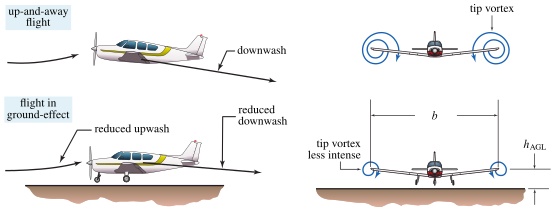
Ground effect ကို JSBSim တွင် မည်သို့ model ပြုလုပ်နိုင်သည်ကို ကြည့်ရန်၊ Cessna 172 Skyhawk model ကို ကြည့်နိုင်ပါသည်။ ၎င်းကို file: <JSBSim-root-dir>/aircraft/c172p/c172p.xml တွင် implement ပြုလုပ်ထားပါသည်။ ဤ XML file ၏ <aerodynamics/> block တွင် non-dimensional factor နှစ်ခုဖြစ်သော \(K_{C_D,\mathrm{ge}}\) နှင့် \(K_{C_L,\mathrm{ge}}\) ကို model ပြုလုပ်ထားပြီး၊ ၎င်းတို့မှာ ground အထက်ရှိ non-dimensional height ၏ function များဖြစ်ကာ အသီးသီး lift နှင့် drag ၏ multiplier များဟု ယူဆရပါသည်။ ဤ factor များကို အောက်ပါအတိုင်း သတ်မှတ်ထားပါသည်-
<function name="aero/function/kCDge">
   <description>Change in drag due to ground effect</description>
   <product>
      <value>1.0</value>
      <table>
         <independentVar> aero/h_b-mac-ft </independentVar>
         <tableData>
            0.0000 0.4800
            0.1000 0.5150
            0.1500 0.6290
            0.2000 0.7090
            0.3000 0.8150
            0.4000 0.8820
            0.5000 0.9280
            0.6000 0.9620
            0.7000 0.9880
            0.8000 1.0000
            0.9000 1.0000
            1.0000 1.0000
            1.1000 1.0000
         </tableData>
      </table>
   </product>
</function>

<function name="aero/function/kCLge">
   <description>Change in lift due to ground effect</description>
   <product>
      <value>1.0</value>
      <table>
         <independentVar> aero/h_b-mac-ft </independentVar>
         <tableData>
            0.0000 1.2030
            0.1000 1.1270
            0.1500 1.0900
            0.2000 1.0730
            0.3000 1.0460
            0.4000 1.0550
            0.5000 1.0190
            0.6000 1.0130
            0.7000 1.0080
            0.8000 1.0060
            0.9000 1.0030
            1.0000 1.0020
            1.1000 1.0000
         </tableData>
      </table>
   </product>
</function>
Factor \(K_{C_D,\mathrm{ge}}\) နှင့် \(K_{C_L,\mathrm{ge}}\) တို့ကို ကိုယ်စားပြုသော tabular function aero/function/kCDge and aero/function/kCLge ကို non-dimensional ground altitude \(h/(b/2)\) နှင့် ဆန့်ကျင်၍ အောက်ပါပုံတွင် plot ဆွဲပြထားပါသည်။ လေယာဉ်၏ ground အထက် altitude သည် wing semi-span \(b/2\) ထက် ငယ်သည့်အခါ ground-effect ကို တွေ့ရပါသည်။ Altitude ပိုမြင့်လာသည့်အခါ ဤ factor နှစ်ခုစီသည် value 1 ကို ယူပါသည်။
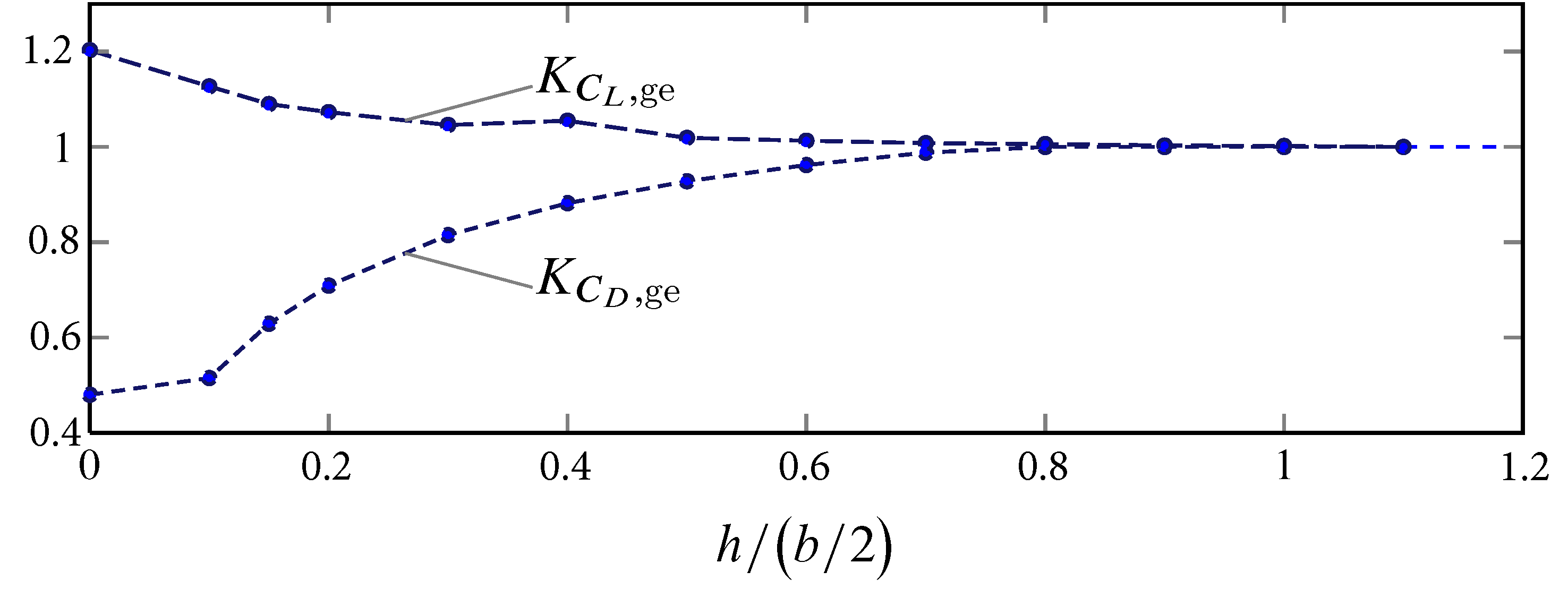
c172p ၏ aerodynamic model တွင် 'aero/function/kCLge' နှင့် 'aero/function/kCDge' ဟု အမည်ပေးထားသော property များကို သတ်မှတ်ပေးသော non-dimensional ground altitude \(h/(b/2)\) ၏ plot လုပ်ထားသော function များ။
Tables (Table များ)
အတိုင်း ၁ ခု၊ ၂ ခု၊ သို့မဟုတ် ၃ ခုပါသော lookup table များကို aerodynamics နှင့် function definition များတွင် အသုံးပြုရန် JSBSim တွင် သတ်မှတ်နိုင်ပါသည်။ "vector" lookup table တစ်ခုတည်းအတွက်၊ format မှာ အောက်ပါအတိုင်း ဖြစ်ပါသည်-
<table name="property_name_0">
   <independentVar lookup="row"> property_name_1 </independentVar>
   <tableData>
      key_1  value_1
      key_2  value_2
      ...    ...
      key_n  value_n
   </tableData>
</table>
ဤကိစ္စတွင် <independentVar/> element ရှိ lookup="row" attribute သည် optional ဖြစ်ပါသည်၊ independentVar ကို row variable တစ်ခုဟု ယူဆထားပါသည်။ Real ဥပမာတစ်ခုကို ဤတွင် ပြသထားပါသည်-
<table>
   <independentVar lookup="row"> aero/alpha-rad </independentVar>
   <tableData>
      -1.57  1.500
      -0.26  0.033
       0.00  0.025
       0.26  0.033
       1.57  1.500
   </tableData>
</table>
Data table ၏ ပထမ column သည် lookup index (သို့မဟုတ် breakpoint, သို့မဟုတ် key) များကို ကိုယ်စားပြုပါသည်။ ဤကိစ္စတွင်၊ lookup index မှာ aero/alpha-rad (angle of attack, radian ဖြင့်) ဖြစ်ပါသည်။ aero/alpha-rad သည် \(0.26\) radians ဖြစ်ပါက၊ lookup table မှ ပြန်ရသော value သည် \(0.033\) ဖြစ်ပါလိမ့်မည်။
2D table တစ်ခုအတွက် definition မှာ အောက်ပါအတိုင်း ဖြစ်ပါသည်-
<table name="property_name_0">
   <independentVar lookup="row">    property_name_1 </independentVar>
   <independentVar lookup="column"> property_name_2 </independentVar>
   <tableData>
                  {col_1_key   col_2_key   ...  col_n_key }
      {row_1_key} {col_1_data  col_2_data  ...  col_n_data}
      {row_2_key} {...         ...         ...  ...       }
      {   ...   } {...         ...         ...  ...       }
      {row_n_key} {...         ...         ...  ...       }
   </tableData>
</table>
Data ကို grid format ဖြင့် ထားရှိပါသည်။ Real ဥပမာတစ်ခုကို အောက်တွင် ပြသထားပါသည်။ Radian ဖြင့် alpha သည် row lookup ဖြစ်ပြီး (alpha breakpoint များကို ပထမ column တွင် စီထားပါသည်) degree ဖြင့် flap position ကို deflection 0, 10, 20, နှင့် 30 degree အတွက် column များအဖြစ် ခွဲထားပါသည်-
<table>
   <independentVar lookup="row">    aero/alpha-rad   </independentVar>
   <independentVar lookup="column"> fcs/flap-pos-deg </independentVar>
   <tableData>
                 0.0          10.0        20.0       30.0
     -0.0523599  8.96747e-05  0.00231942  0.0059252  0.00835082
     -0.0349066  0.000313268  0.00567451  0.0108461  0.0140545
     -0.0174533  0.00201318   0.0105059   0.0172432  0.0212346
      0.0        0.0051894    0.0168137   0.0251167  0.0298909
      0.0174533  0.00993967   0.0247521   0.0346492  0.0402205
      0.0349066  0.0162201    0.0342207   0.0457119  0.0520802
      0.0523599  0.0240308    0.0452195   0.0583047  0.0654701
      0.0698132  0.0333717    0.0577485   0.0724278  0.0803902
      0.0872664  0.0442427    0.0718077   0.088081   0.0968405
  </tableData>
</table>
Coefficient တစ်ခုတွင် 3D table တစ်ခုအတွက် definition မှာ (ဥပမာအနေဖြင့်) ဤကဲ့သို့ ဖြစ်ပါသည်-
<table name="property_name_0">
   <independentVar lookup="row">    property_name_1 </independentVar>
   <independentVar lookup="column"> property_name_2 </independentVar>
   <independentVar lookup="table">  property_name_3 </independentVar>
   <tableData  breakpoint="table_1_key">
                  {col_1_key   col_2_key   ...  col_n_key }
      {row_1_key} {col_1_data  col_2_data  ...  col_n_data}
      {row_2_key} {...         ...         ...  ...       }
      {   ...   } {...         ...         ...  ...       }
      {row_n_key} {...         ...         ...  ...       }
   </tableData>
   <tableData  breakpoint="table_2_key">
                  {col_1_key   col_2_key   ...  col_n_key }
      {row_1_key} {col_1_data  col_2_data  ...  col_n_data}
      {row_2_key} {...         ...         ...  ...       }
      {   ...   } {...         ...         ...  ...       }
      {row_n_key} {...         ...         ...  ...       }
   </tableData>
   ...
   <tableData  breakpoint="table_n_key">
                  {col_1_key   col_2_key   ...  col_n_key }
      {row_1_key} {col_1_data  col_2_data  ...  col_n_data}
      {row_2_key} {...         ...         ...  ...       }
      {   ...   } {...         ...         ...  ...       }
      {row_n_key} {...         ...         ...  ...       }
   </tableData>
</table>
အထက်ပါ tableData element ၏ breakpoint attribute ကို သတိပြုပါ။ ဥပမာတစ်ခု ဖော်ပြရန်-
<table>
   <independentVar lookup="row">    fcs/row-value    </independentVar>
   <independentVar lookup="column"> fcs/column-value </independentVar>
   <independentVar lookup="table">  fcs/table-value  </independentVar>
   <tableData breakPoint="-1.0">
           -1.0    1.0
      0.0  1.0000  2.0000
      1.0  3.0000  4.0000
   </tableData>
   <tableData breakPoint="0.0000">
           0.0     10.0
      2.0  1.0000  2.0000
      3.0  3.0000  4.0000
   </tableData>
   <tableData breakPoint="1.0">
            0.0     10.0    20.0
       2.0  1.0000  2.0000  3.0000
       3.0  4.0000  5.0000  6.0000
      10.0  7.0000  8.0000  9.0000
   </tableData>
</table>
Table value များကို linear အနေဖြင့် interpolate ပြုလုပ်ပြီး၊ table limit တွင် extrapolation မပြုလုပ်ကြောင်း — table တစ်ခု ပြန်ပေးနိုင်သည့် အမြင့်ဆုံးတန်ဖိုးသည် ၎င်းတွင် သတ်မှတ်ထားသော အမြင့်ဆုံး value ဖြစ်ကြောင်း သတိပြုပါ။
Interpolate 1D
Simulation ရှိ lookup table အချို့ (အထူးသဖြင့် aerodynamic data အတွက်) သည် dimension လေးခု၊ ငါးခု၊ ခြောက်ခု၊ သို့မဟုတ် ပို၍ပင် များနိုင်ပါသည်။ Interpolate1d သည် ပေးအပ်ထားသော value များ၏ 1-dimensional interpolation ၏ ရလဒ်ကို ပြန်ပေးပါသည်၊ ပထမ immediate child element ၏ value သည် table ထဲသို့ lookup value ကို ကိုယ်စားပြုပြီး၊ နောက်ပါ value cặp များသည် independent နှင့် dependent value များကို ကိုယ်စားပြုပါသည်။ ပေးအပ်ထားသော ပထမ child element သည် property တစ်ခု ဖြစ်မည်ဟု မျှော်လင့်ပါသည်။ Interpolation က extrapolate မလုပ်ဘဲ၊ ပေးအပ်ထားသော lookup value သည် ပေးအပ်ထားသော range ၏ အပြင်ဘက်ရောက်သွားပါက အမြင့်ဆုံး value ကို ထိန်းထားပါသည်။ Format မှာ အောက်ပါအတိုင်း ဖြစ်ပါသည်-
<interpolate1d>
  {property, value, table, function}
  {property, value, table, function} {property, value, table, function}
  ...
</interpolate1d>
ဥပမာ- Mach 0.4 ဖြစ်ပါက interpolation က 0.375 ကို ပြန်ပေးပါလိမ့်မည်။ Mach 1.5 ဖြစ်ပါက interpolation က 0.60 ကို ပြန်ပေးပါလိမ့်မည်။
<interpolate1d>
  <p> velocities/mach </p>
  <v> 0.00 </v>  <v> 0.25 </v>
  <v> 0.80 </v>  <v> 0.50 </v>
  <v> 0.90 </v>  <v> 0.60 </v>
</interpolate1d>
အထက်ပါ ဥပမာသည် အလွန် ရိုးရှင်းသော ဥပမာတစ်ခု ဖြစ်ပါသည်။ ပို၍ ရှုပ်ထွေးသော ဥပမာတစ်ခုတွင် (ပထမ argument မှလွဲ၍) argument မည်သည့်ခုမဆို function တစ်ခုကို အသုံးပြုနိုင်ပါသည်။ ဆိုလိုသည်မှာ breakpoint vector သည် variable ဖြစ်နိုင်ပါသည် — ၎င်းသည် ပုံမှန်မဟုတ်နိုင်ပါ — သို့သော် ပိုအရေးကြီးသည်မှာ lookup vector (ဒုတိယ column) ရှိ value များသည် dimension ၁ ခု၊ ၂ ခု သို့မဟုတ် ၃ ခုရှိသော function table element များ ဖြစ်နိုင်ပါသည်။ Argument များသည် nested interpolate1d element များပင် ဖြစ်နိုင်ပါသည်။ ဥပမာအနေဖြင့်-
<function name="whatever">
  <interpolate1d>
    <p> velocities/mach </p>
    <v> 0.00 </v>  <table> ... table definition ... </table>
    <v> 0.80 </v>  <table> ... table definition ... </table>
    <v> 0.90 </v>  <table> ... table definition ... </table>
  </interpolate1d>
</function>
ဤအရာကို ပို၍ ဆက်လက် တိုးချဲ့ရန်-
<function name="bigWhatever1">
  <interpolate1d>
    <p> aero/qbar-psf </p>
    <v> 0 </v>  <interpolate1d>
                  <p> velocities/mach </p>
                  <v> 0.00 </v>  <table> ... table 1 definition ... </table>
                  <v> 0.80 </v>  <table> ... table 2 definition ... </table>
                  <v> 0.90 </v>  <table> ... table 3 definition ... </table>
                </interpolate1d>
    <v> 65 </v> <interpolate1d>
                  <p> velocities/mach </p>
                  <v> 0.00 </v>  <table> ... table 1 definition ... </table>
                  <v> 0.80 </v>  <table> ... table 2 definition ... </table>
                  <v> 0.90 </v>  <table> ... table 3 definition ... </table>
                </interpolate1d>
    <v> 90 </v> <interpolate1d>
                  <p> velocities/mach </p>
                  <v> 0.00 </v>  <table> ... table 1 definition ... </table>
                  <v> 0.80 </v>  <table> ... table 2 definition ... </table>
                  <v> 0.90 </v>  <table> ... table 3 definition ... </table>
                </interpolate1d>
  </interpolate1d>
</function>
အထက်ပါအရာက dimension ငါးခုပါသော lookup table တစ်ခုကို အကျိုးသက်ရောက်မှုအားဖြင့် ပေးပါသည်။ လက်တွေ့တွင် အလွန်ကြီးမားပြီး ရှုပ်ထွေးပါလိမ့်မည်၊ သို့သော်လည်း ထိုသို့ ဖြစ်ပါသည်။ :-)
ဆက်လက်၍ ရှိသေးပါသည်။ အလွန် အလွန်ကြီးမားသော aero database များအတွက်၊ aero coefficient အချို့ကို တွက်ချက်ရန် မလိုအပ်သည့် အချိန်များ ရှိနိုင်ပါသည်။ ဥပမာအားဖြင့်၊ ground effect aero coefficient များကို ground အနီးတွင်သာ တွက်ချက်ရန် လိုအပ်ပါသည်။ Ground effect က aero force နှင့် moment များကို မပံ့ပိုးသည့်အခါ CPU cycle ကို ဘာလို့ အလဟဿ ဖြုန်းနေရမလဲ? Expensive ဖြစ်သော computation များကို bypass ပြုလုပ်ရန် ifthen element ကို အသုံးပြုနိုင်ပါသည်။ ifthen element သည် အောက်ပါအတိုင်း အလုပ်လုပ်ပါသည်-
ပထမ immediate child element ၏ value သည် 1 ဖြစ်ပါက၊ ဒုတိယ immediate child element ၏ value ကို ပြန်ပေးပြီး၊ မဟုတ်ပါက တတိယ child element ၏ value ကို ပြန်ပေးပါသည်။
ပထမ immediate child element ၏ value သည် 1 ဖြစ်ပါက၊ ဒုတိယ immediate child element ၏ value ကို ပြန်ပေးပြီး၊ မဟုတ်ပါက တတိယ child element ၏ value ကို ပြန်ပေးပါသည်။
<ifthen>
  {property, value, table, or other function element}
  {property, value, table, or other function element}
  {property, value, table, or other function element}
</ifthen>
ဥပမာ- flight-mode သည် 2 ထက်ကြီးပါက value 0.00 ကို ပြန်ပေးပြီး၊ မဟုတ်ပါက property control/pitch-lag ၏ value ကို ပြန်ပေးပါသည်။
<ifthen>
  <gt> <p> executive/flight-mode </p> <v> 2 </v> </gt>
  <v> 0.00 </v>
  <p> control/pitch-lag </p>
</ifthen>
ကျွန်ုပ်တို့၏ ကိစ္စတွင်၊ gear ချမထားသရွေ့ zero ကို ပြန်ပေးသော dimension ၅ ခုပါ table lookup ကို အောက်ပါအတိုင်း ရေးနိုင်ပါသည်-
<function name="propertyname">
  <ifthen>
    <lt> <p> position/altitudeMSL </p> <v> 90 </v> </lt>
    <interpolate1d>
      <p> aero/qbar-psf </p>
      <v> 0 </v>  <interpolate1d>
                    <p> velocities/mach </p>
                    <v> 0.00 </v>  <table> ... table 1 definition ... </table>
                    <v> 0.80 </v>  <table> ... table 2 definition ... </table>
                    <v> 0.90 </v>  <table> ... table 3 definition ... </table>
                  </interpolate1d>
      <v> 65 </v> <interpolate1d>
                    <p> velocities/mach </p>
                    <v> 0.00 </v>  <table> ... table 1 definition ... </table>
                    <v> 0.80 </v>  <table> ... table 2 definition ... </table>
                    <v> 0.90 </v>  <table> ... table 3 definition ... </table>
                  </interpolate1d>
      <v> 90 </v> <interpolate1d>
                    <p> velocities/mach </p>
                    <v> 0.00 </v>  <table> ... table 1 definition ... </table>
                    <v> 0.80 </v>  <table> ... table 2 definition ... </table>
                    <v> 0.90 </v>  <table> ... table 3 definition ... </table>
                  </interpolate1d>
    </interpolate1d>
    <v> 0 </v>
  </ifthen>
</function>
အထက်ပါ ဥပမာသည် တစ်နည်းအားဖြင့် အဓိပ္ပာယ်မရှိသော်လည်း format က မှန်ကန်ပါသည်။ Performance ရှုထောင့်မှ ကြည့်ပါက ကောင်းမွန်ပါသည်၊ အကြောင်းမှာ lookup တွင် လက်တွေ့ လိုအပ်မှသာ table များကို execute လုပ်ခြင်း ဖြစ်ပါသည်။